Free PNG Image Editor Online – Edit & Generate PNG Images with AI
Supports JPEG, JPG, WEBP, PNG
Free trial for higher quality image generation
Get a faster, higher-quality, ad-free image generation experience through our professional website
Stable, Cost-Effective Image APIs for Production
Move from free creative testing to reliable application workflows with image APIs selected for strong output quality, competitive pricing, and production-ready stability.
GPT Image 2 API
A polished OpenAI image API with strong prompt adherence, dependable text rendering, and flexible quality controls for marketing and product workflows.
View API detailsNano Banana Pro API
Google's high-fidelity image API for precise semantic control, multilingual typography, consistent creative direction, and detailed 4K output.
View API detailsSeedream 5.0 Pro API
A production-focused image API for realistic detail, commercial visuals, refined composition, and stable high-quality creative generation.
View API detailsQwen Image 2.0 API
A value-oriented API with strong multilingual prompt understanding, clear text rendering, flexible formats, and efficient high-volume generation.
View API detailsZ Image API
A fast and affordable text-to-image API for rapid concept iteration, social assets, illustrations, and scalable everyday content production.
View API detailsFree PNG Image Editor Before-and-After Results
See how a clear text prompt can transform portraits, transparent-style product assets, travel photos, ads, and social visuals while preserving important subjects and composition.
Change Clothing and Portrait Styling
Before: A neutral studio portrait in a simple beige outfit.
After: Change the outfit to elegant emerald fashion and create a warm editorial studio background while preserving her face and pose.
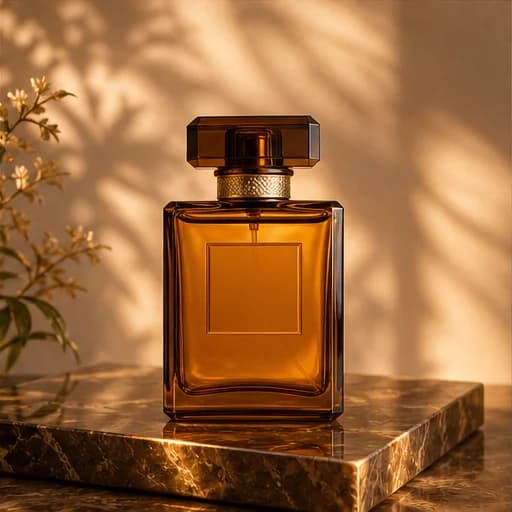
Turn a Product PNG into an Advertisement
Before: An amber perfume bottle photographed on a plain white surface.
After: Create a premium golden perfume advertisement with a glossy stone pedestal, soft botanical shadows, and luxury campaign lighting.
Remove Objects and Rebuild the Scene
Before: A city travel portrait with a distracting red bin and a flat gray sky.
After: Remove the red bin, replace the overcast sky with a warm sunset, and add subtle cinematic color without changing the traveler or architecture.
Powerful Free PNG Image Editor Features
Go beyond crop tools and basic filters. Use natural-language prompts to generate new visuals or make context-aware edits for portraits, products, ads, social posts, presentations, and creative projects.
Change, Add, or Remove Objects
Describe the exact object to replace, erase, recolor, resize, or add. Include its location and explain what surrounding details should remain unchanged for a more controlled edit.
Replace Backgrounds and Build New Scenes
Move a subject into a clean studio, lifestyle setting, seasonal campaign, travel scene, branded environment, or imaginative world while keeping the main subject recognizable.
Generate New Images from Text
Start without an upload and describe a subject, composition, lighting, materials, palette, mood, visible text, and final use to create an original image with the GPT Image 2 workflow.
Guide Edits with Up to Five References
Upload PNG, JPG, JPEG, or WebP references to guide identity, product shape, pose, colors, layout, or art direction and create more consistent visual variations.
Practical Uses for a Free PNG Image Editor
Create useful visual assets for ecommerce, marketing, content creation, education, presentations, entertainment, design exploration, and personal projects through one simple online workflow.
E-commerce and Product Images
Clean up product assets, replace plain backgrounds, create lifestyle settings, change product colors, and develop polished listing or campaign variations.
Advertising and Brand Creative
Turn a simple source image into product ads, launch graphics, promotional concepts, branded scenes, posters, and landing-page visuals without rebuilding every asset manually.
Portraits, Avatars, and Social Content
Update outfits, remove distractions, refine lighting, explore new locations, and create attractive profile images, thumbnails, posts, and creator visuals.
Design Concepts and Personal Projects
Generate illustrations, presentation graphics, story ideas, invitations, educational visuals, mood boards, and rapid concept variations from a prompt or reference image.
How to Use the Free PNG Image Editor
Create or edit an image in three simple steps—no layers, masks, installation, or advanced design experience required.
Upload a PNG or Start with Text
Describe the Result Precisely
Generate, Review, and Refine